
What is the Weight Loss Percentage Calculator?
The Weight Loss Percentage Calculator works out how much of your starting weight you have lost, or gained, as a percentage. Add a goal weight to see how far along you are, or use Target % to find what you will weigh after losing 5%, 10% or any percentage. For example, someone tracking their progress can see that 7.5 kg off 92 kg is 8.15%.
It does the percentage maths only. It is not health advice.
How to calculate the percentage of weight loss
Take your current weight away from your starting weight, divide by your starting weight, and multiply by 100. Say you have gone from 92 kg to 84.5 kg: (92 − 84.5) ÷ 92 × 100 = 8.15%.
This means that the percentage always uses your starting weight as the base, so the same kilograms count for more if you started lighter. To compare any two numbers this way, use the Percentage Change Calculator.
How to use the weight loss percentage calculator
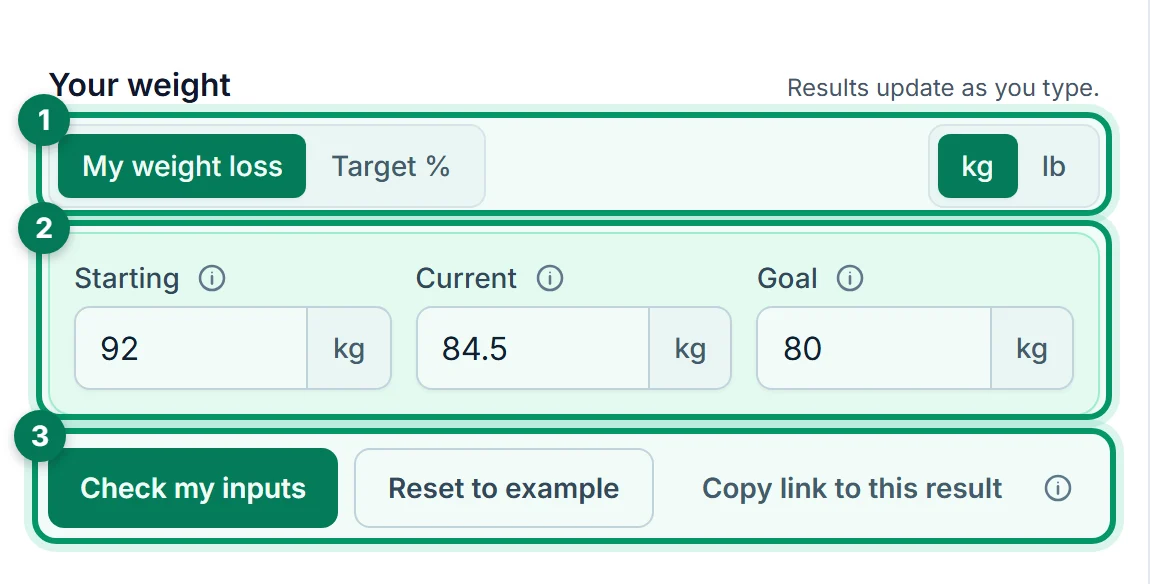
Choose what to work out, and the unit
My weight loss for the percentage you’ve lost, or Target % for a goal weight. Choose kg or lb.
Enter your weights
Your starting and current weight, and a goal if you have one. For Target %, your starting weight and the percentage to lose.
Read or share the result
The result updates as you type. Copy link to this result keeps your numbers in a link.
Your results, explained
Here are the results for the example: from 92 kg to 84.5 kg, with a goal of 80 kg.
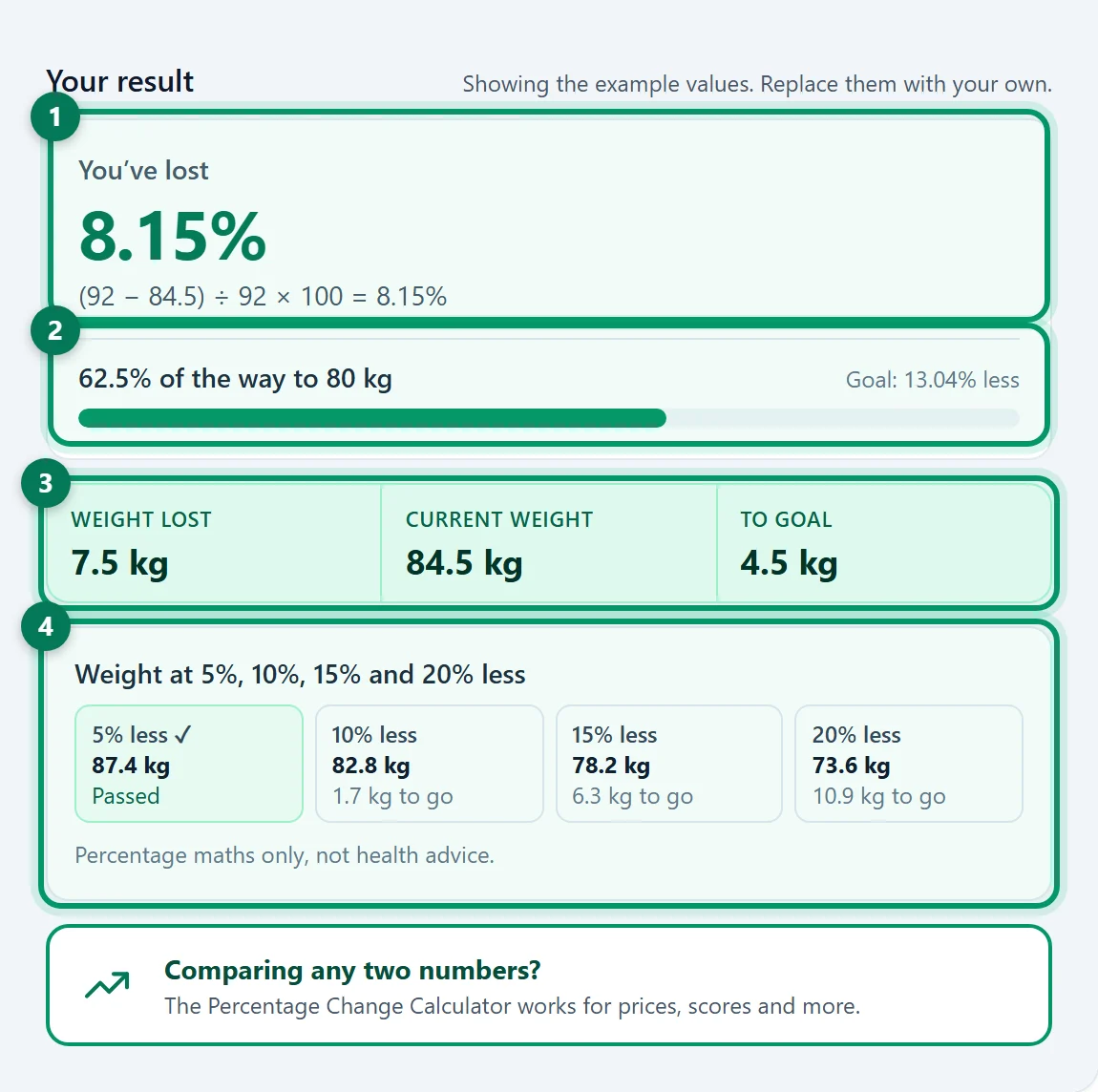
1. You’ve lost 8.15%
From 92 kg to 84.5 kg: (92 − 84.5) ÷ 92 × 100 = 8.15% of your starting weight.
2. Progress to your goal
A goal of 80 kg means losing 12 kg in all. You’ve lost 7.5 kg, so you are 62.5% of the way there.
Leave the goal blank and this line shows the weight you’ve lost out of your starting weight instead.
3. Lost, current weight and what’s left
For example, 7.5 kg lost, 84.5 kg now, and 4.5 kg to go to 80 kg.
4. The 5%, 10%, 15% and 20% marks
The weight at each percentage of your starting weight. A tick means you have passed it; the others show how much is left.
How each mode works: inputs and results
Answers: What percentage of my weight have I lost, and how far am I from my goal?
Inputs
| Input | What to enter |
|---|---|
| Starting weight | Your weight when you started, in kg or lb. Example: 92 kg |
| Current weight | Your weight now, in the same unit. Example: 84.5 kg |
| Goal weight (optional) | The weight you are aiming for, below your starting weight. Example: 80 kg |
Results
| Result | What it tells you |
|---|---|
| Percentage lost or gained | The change as a share of your starting weight. |
| Progress to goal | How much of the way to your goal you have come. |
| Lost, current and to go | The change in kg or lb, your weight now and what is left to your goal. |
| 5%, 10%, 15% and 20% marks | The weight at each percentage of your starting weight. |
The maths
Weight loss % = (starting − current) ÷ starting × 100
Progress to goal = (starting − current) ÷ (starting − goal) × 100
Weight at a mark = starting × (1 − mark ÷ 100)
Example
(92 − 84.5) ÷ 92 × 100 = 8.15%; 7.5 ÷ 12 = 62.5% of the way to 80 kg.
Answers: What will I weigh after losing 5% (or any percentage) of my weight?
Inputs
| Input | What to enter |
|---|---|
| Starting weight | Your weight now or when you started. Example: 92 kg |
| Target | The percentage you want to lose. The buttons fill in 5, 10, 15 or 20%. Example: 5% |
Results
| Result | What it tells you |
|---|---|
| Goal weight | Your starting weight less that percentage. |
| To lose | How many kg or lb that is. |
The maths
Goal weight = starting × (1 − target ÷ 100)
To lose = starting × target ÷ 100
Example
92 × (1 − 0.05) = 87.4 kg, which is 4.6 kg to lose.
Worked example: a 5 percent weight loss in pounds
Say you weigh 200 lb and want to know what a 5% weight loss means.
5% of 200 lb = 200 × 0.05 = 10 lb
Goal weight = 200 × (1 − 0.05) = 190 lb
Lose 10 lb to reach 190 lb
In this scenario, 10% would be 20 lb (180 lb), and 15% would be 30 lb (170 lb). Each mark uses the starting weight, not the weight at the previous mark.
Weight gain percentage
The calculator works the other way too. If your current weight is above your starting weight, it shows the percentage you’ve gained. For instance, going from 80 kg to 84 kg is (84 − 80) ÷ 80 × 100 = 5%. This is useful when the goal is to gain weight, or for tracking a pet’s or a child’s growth against an earlier weight.
Frequently asked questions
How do I calculate the percentage of weight loss?
What is 5% of my body weight?
How do I calculate weight gain percentage?
Why use a percentage instead of kilograms?
Does it work in pounds?
Is this health advice?
More percentage calculators
Daily Attendance CalculatorTrack school or work attendance as a percentageOpen calculator →- Percentage Decrease CalculatorTake a percentage off any starting number.Open calculator
- Percentage Change CalculatorPercent change between any two measurements.Open calculator
- Percentage CalculatorWhat percent one weight is of another.Open calculator
- Loss Recovery Percentage CalculatorThe rise needed to get back to a starting value.Open calculator