
What is the Daily Data Usage Calculator?
The Daily Data Usage Calculator divides the mobile data you have left by the days until it expires, to give a daily amount you can use without running out. Add what you do each day, and it shows whether your usual use will last, the day it would run out, and what to cut.
Will your data last until it expires?
You have 20 GB left and the promo ends on the 30th. That sounds like plenty, until an hour of HD video a day uses more than 1 GB. Spread evenly, 20 GB over 17 days is 1.17 GB a day: about one hour of YouTube at 720p, or two and a half hours at 480p.
For a single viewing session, use the YouTube Data Usage Calculator or the Netflix Data Calculator; to estimate a month of use, the Data Usage Calculator.
How to use the calculator
Enter your data and its expiry
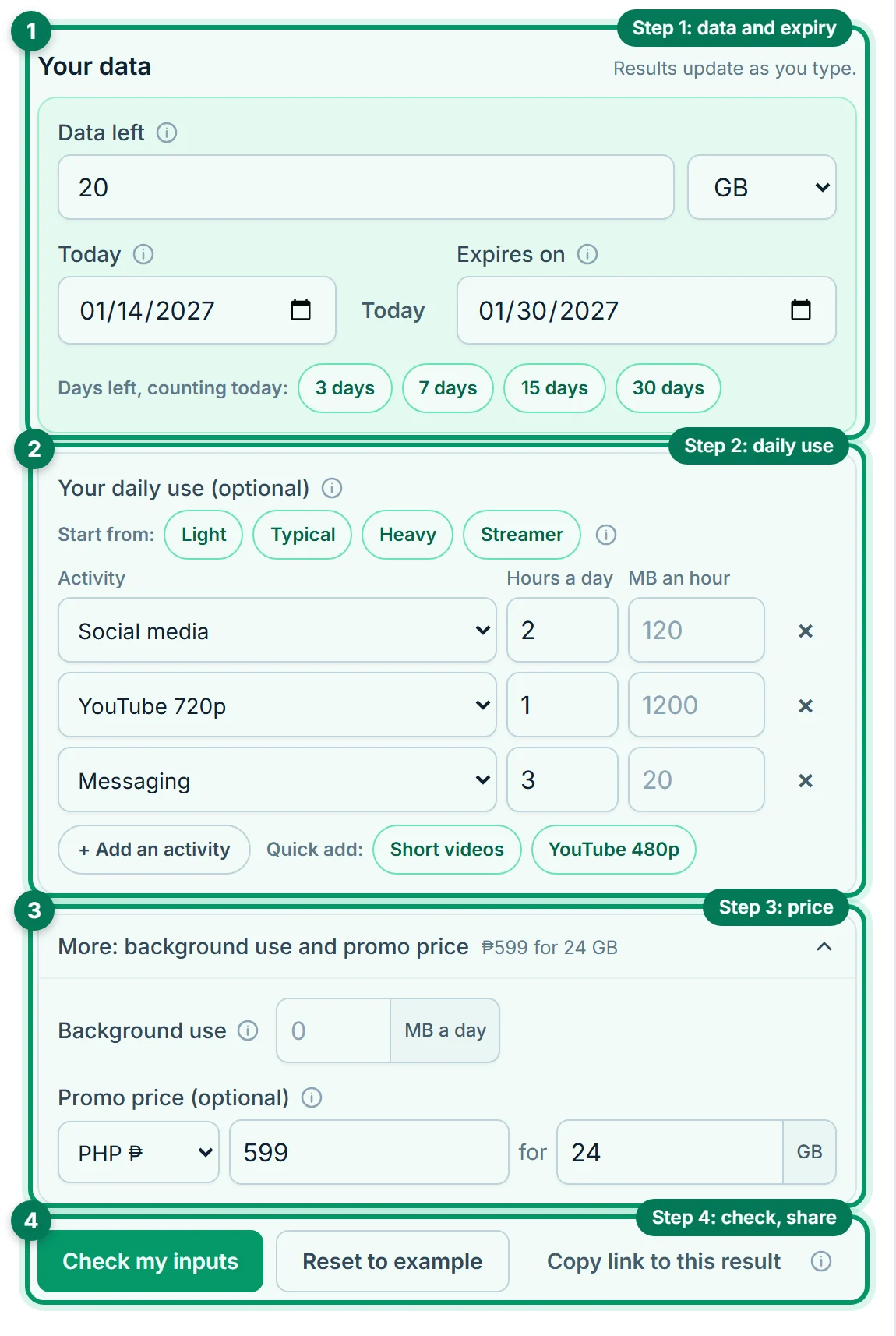
Enter the Data left on your plan or promo, in GB or MB, as your network’s app or text shows it. Set Today and the date it Expires on; both days count. Or press 3, 7, 15 or 30 days for a promo that many days long, counting today.
Add how you use data (optional)
Under Your daily use, add what you do each day and the Hours a day: 1.5 or 1:30 for an hour and a half. Start from Light, Typical, Heavy or Streamer fills it in for you; Quick add adds one activity.
Add background use and price (optional)
Open More to add Background use for updates and backups, and the Promo price with the promo’s total data, to see the cost per GB and what each day’s data is worth.
Read or share the result
Results update as you type. Check my inputs points to anything that needs fixing, and Copy link to this result keeps your numbers in a link, to check again in a few days.
Your results, explained
Here are the results for the example: 20 GB left on 14 January 2027, expiring on the 30th, with 2 hours of social media, an hour of YouTube at 720p and 3 hours of messaging a day.
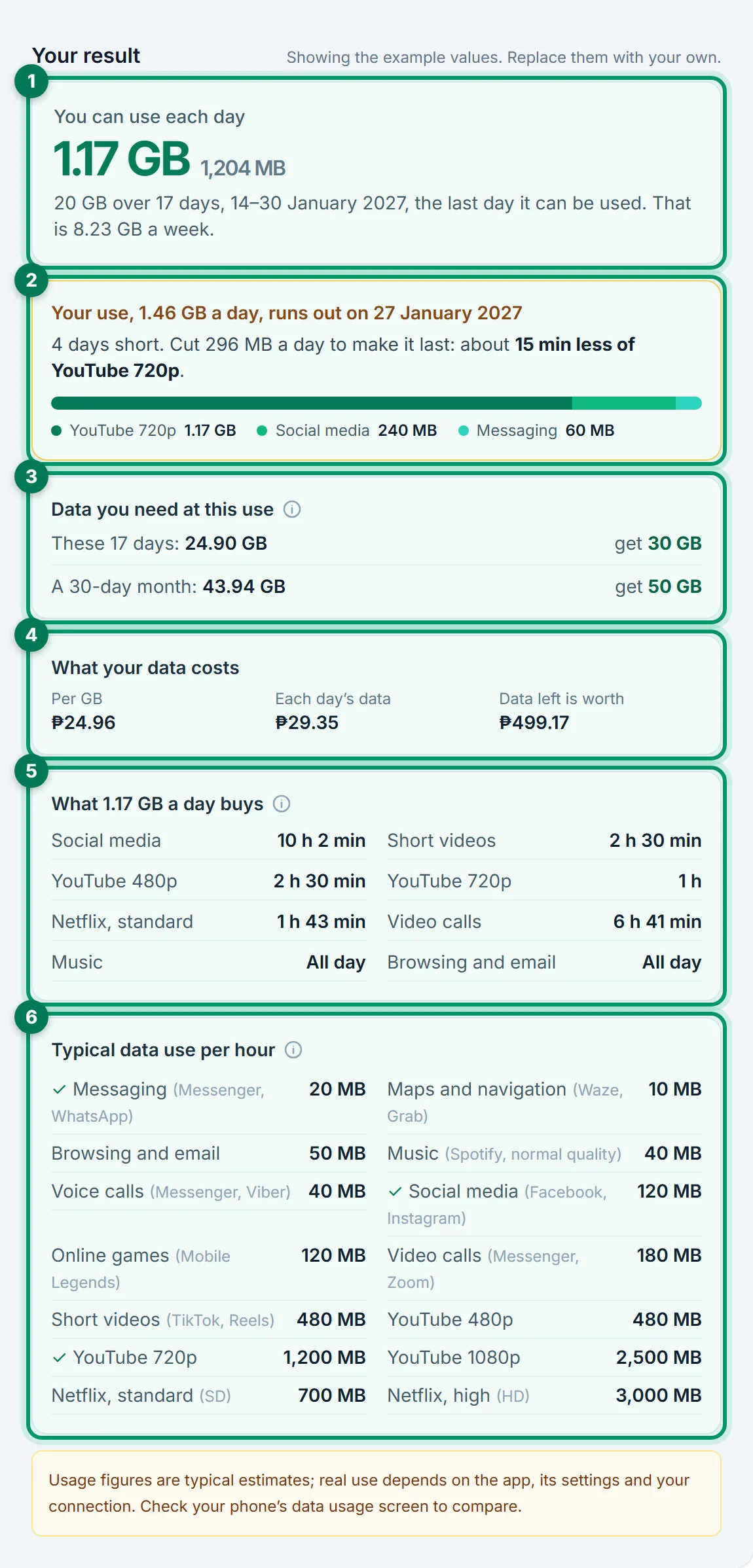
1. You can use 1.17 GB each day
20 GB is 20 × 1,024 = 20,480 MB. Spread over the 17 days from 14 to 30 January, both days counted, that is 20,480 ÷ 17 = 1,204 MB, or 1.17 GB a day.
The amount is rounded down to the MB, so using it every day never runs you out before the expiry date.
2. Your daily use: it runs out on 27 January
2 h of social media, 1 h of YouTube 720p and 3 h of messaging use 240 + 1,200 + 60 = 1,500 MB, or 1.46 GB a day. 20,480 MB lasts 13 full days, so it runs out on 27 January, 4 days short.
To make it last, cut 296 MB a day: about 15 min less of YouTube 720p, the heaviest activity. The bar shows which activity uses the most.
3. Data you need: a 30 GB promo for these 17 days
At 1,500 MB a day, the 17 days need 1,500 × 17 = 25,500 MB, or 24.90 GB. With a 10% margin that is 27.39 GB, so a 30 GB promo covers it. A 30-day month needs 43.94 GB: a 50 GB promo.
The margin covers heavier days and use the estimates miss. Sizes are common promo sizes: 1, 2, 3, 5, 8, 10, 12, 15, 20, 24, 30, 36, 40, 50, 60, 72 and 100 GB.
4. What your data costs: ₱24.96 per GB
₱599 for 24 GB is 599 ÷ 24 = ₱24.96 per GB. Each day’s 1.17 GB is worth ₱29.35, and the 20 GB still left is worth ₱499.17.
If your use would leave data unused at the expiry date, the card shows what that data cost you, a reason to pick a smaller promo next time.
5. What 1.17 GB a day buys
The same day’s data in time: 2 h 30 min of YouTube 480p or short videos, 1 h of YouTube 720p, 1 h 43 min of Netflix in standard quality, or 10 h 2 min of social media feeds.
Each is on its own: mixing activities shares the day’s data between them.
6. Typical data use per hour
A benchmark for common apps: about 20 MB an hour for messaging, 120 MB for Facebook or Instagram, 480 MB for TikTok, Reels or YouTube at 480p, 1,200 MB for YouTube at 720p and 3,000 MB for Netflix in HD.
Select any line to add it to Your daily use. A ✓ marks the activities already on your list.
How the calculator works: inputs and results
Answers: How much data can I use each day until my data expires, and will my usual use last?
Inputs
| Input | What to enter |
|---|---|
| Data left | The data still on your plan or promo, in GB or MB. Check it in your network’s app or by text. Example: 20 GB |
| Today and Expires on | Today, and the last day the data can be used. Both days count. Example: 2027-01-14 and 2027-01-30 |
| Your daily use (optional) | What you do each day and for how long, as decimal hours (1.5) or hours and minutes (1:30). Start from Light, Typical, Heavy or Streamer, or add activities one by one. Each has a typical MB an hour, which you can change. Example: Social media 2 h, YouTube 720p 1 h, Messaging 3 h |
| Background use (optional) | Data used in the background each day: app updates, photo backups and syncing. Example: Blank, or 50 MB a day |
| Promo price (optional) | What you paid and the promo’s total data. Blank data uses the data left. Example: ₱599 for 24 GB |
Results
| Result | What it tells you |
|---|---|
| You can use each day | The main result: data left ÷ days until it expires, and the same a week. |
| Your daily use | Shown when you add activities: your MB a day, whether it lasts, the day it runs out, and how much to cut. |
| Data you need at this use | Your daily use over these days and over a 30-day month, with a 10% margin and a suggested promo size. |
| What your data costs | With a price: the cost per GB, what each day’s data is worth, and what the data left and any unused data are worth. |
| What a day’s data buys | Your daily amount in hours of common activities. |
The maths
Data in MB = GB × 1,024 (how mobile networks count)
Days = expiry date − today + 1 (both days count)
Each day = data ÷ days, rounded down to the MB
Your use = Σ hours × MB an hour; it lasts ⌊data ÷ your use⌋ full days
Time an amount buys = MB ÷ MB an hour
Data you need = your use × days × 1.1, rounded up to a common promo size
Cost per GB = price ÷ promo GB
Example
20 GB from 14 to 30 January is 20,480 MB ÷ 17 = 1,204 MB (1.17 GB) a day. Using 1,500 MB a day, it runs out on 27 January.
Worked example: a 24 GB, 30-day promo
You register a 30-day promo with 24 GB on 1 January 2027. It can be used until 30 January. These figures are illustrative; check your own promo’s data and validity.
Data = 24 × 1,024 = 24,576 MB
Days = 1 to 30 January = 30
24,576 ÷ 30 = 819 MB a day
If the promo cost ₱599, each GB costs ₱24.96 and each day’s 819 MB is worth ₱19.96. 819 MB a day is about 1 h 42 min of YouTube at 480p, 40 min at 720p, or 6 h 49 min of social media feeds. If most of your data goes on video, switching from 720p to 480p is the single biggest saving: 480 MB an hour instead of 1,200.
How much data do apps use?
Typical figures, which the calculator uses as starting points. Your phone’s data usage screen shows your own.
| Activity | MB an hour |
|---|---|
| Messaging (Messenger, WhatsApp) | 20 |
| Maps and navigation (Waze, Grab) | 10 |
| Browsing and email | 50 |
| Music (Spotify, normal quality) | 40 |
| Voice calls (Messenger, Viber) | 40 |
| Social media (Facebook, Instagram) | 120 |
| Online games (Mobile Legends) | 120 |
| Video calls (Messenger, Zoom) | 180 |
| Short videos (TikTok, Reels) | 480 |
| YouTube 480p | 480 |
| YouTube 720p | 1,200 |
| YouTube 1080p | 2,500 |
| Netflix, standard (SD) | 700 |
| Netflix, high (HD) | 3,000 |
Before relying on the result
- Background use counts. App updates, backups and autoplay use data you never see. Leave some margin.
- Check the expiry time. Some promos end at a set time on the last day, not at midnight.
- Video quality varies. Apps may raise quality on a fast connection; set it yourself to keep use predictable.
- Check again after a few days, with the data you actually have left.
Frequently asked questions
How do I work out how much data I can use per day?
Is 1 GB 1,000 MB or 1,024 MB?
How much data does YouTube use?
How much data does Netflix use?
Will my data last until it expires?
How do I make my data last longer?
Are these usage figures exact?
How much data do I need for a month?
How much does each GB of my promo cost?
Does using my phone as a hotspot use more data?
How can Wi-Fi help my data last?
Is anything saved when I copy a link to my result?
Related data calculators
Keep planning with the tools that answer the next question.
- Data Usage CalculatorEstimate the mobile data you need a month from what you do on your phone. Open calculator
- Internet Usage CalculatorWork out your home internet use a month, and the speed your household needs. Open calculator
- YouTube Data Usage CalculatorSee how much data a YouTube session uses at each video quality. Open calculator
- Netflix Data CalculatorSee how much data a Netflix series or movie uses at each quality. Open calculator
- Daily Spending Allowance CalculatorThe same idea for money: what you can spend each day until payday. Open calculator