
What is the Internet Usage Calculator?
The Internet Usage Calculator adds up what everyone at home does online, from TV streaming to video meetings and game downloads, and turns it into data a month and the speed your connection needs. Use it to choose a home WiFi, fiber or pocket WiFi plan that fits.
How much internet does a home use?
Far more than a phone. A family of four with two hours of HD TV a day, phones on YouTube and short videos, and 20 GB of game downloads uses about 368 GB a month and needs a 50 Mbps plan. A single person who skips TV streaming uses about 56 GB.
For your phone’s own data, use the Data Usage Calculator; to spread a promo to its expiry date, the Daily Data Usage Calculator.
How to use the calculator
List what your household does
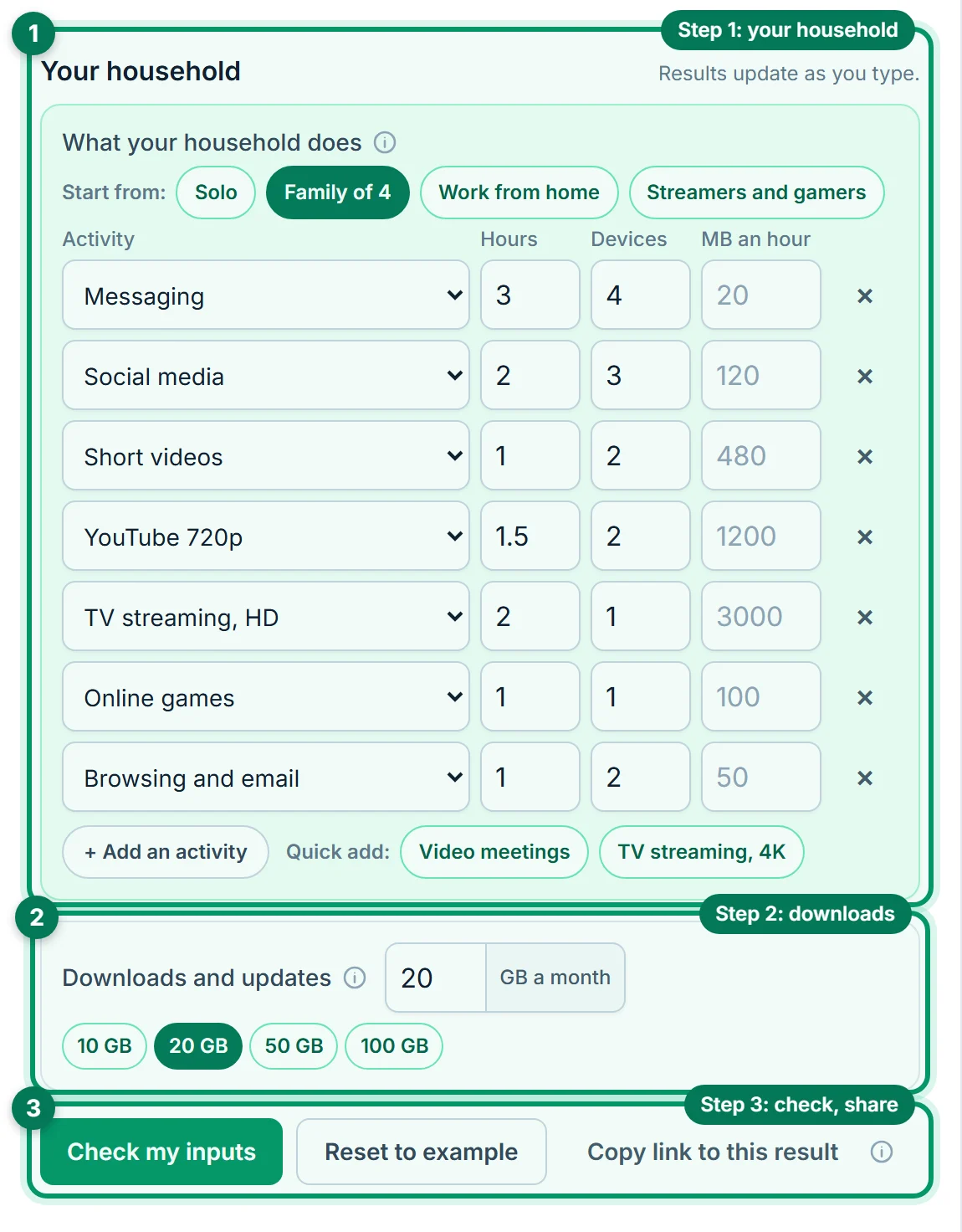
Press a profile to start, then adjust each activity: the Hours each device does it a day, and how many Devices do it at the busiest time, such as two phones on YouTube while the TV streams.
Add downloads
Enter the Downloads and updates in GB a month: games, apps, system updates and backups.
Read or share the result
Results update as you type. Copy link to this result keeps your numbers in a link.
Your results, explained
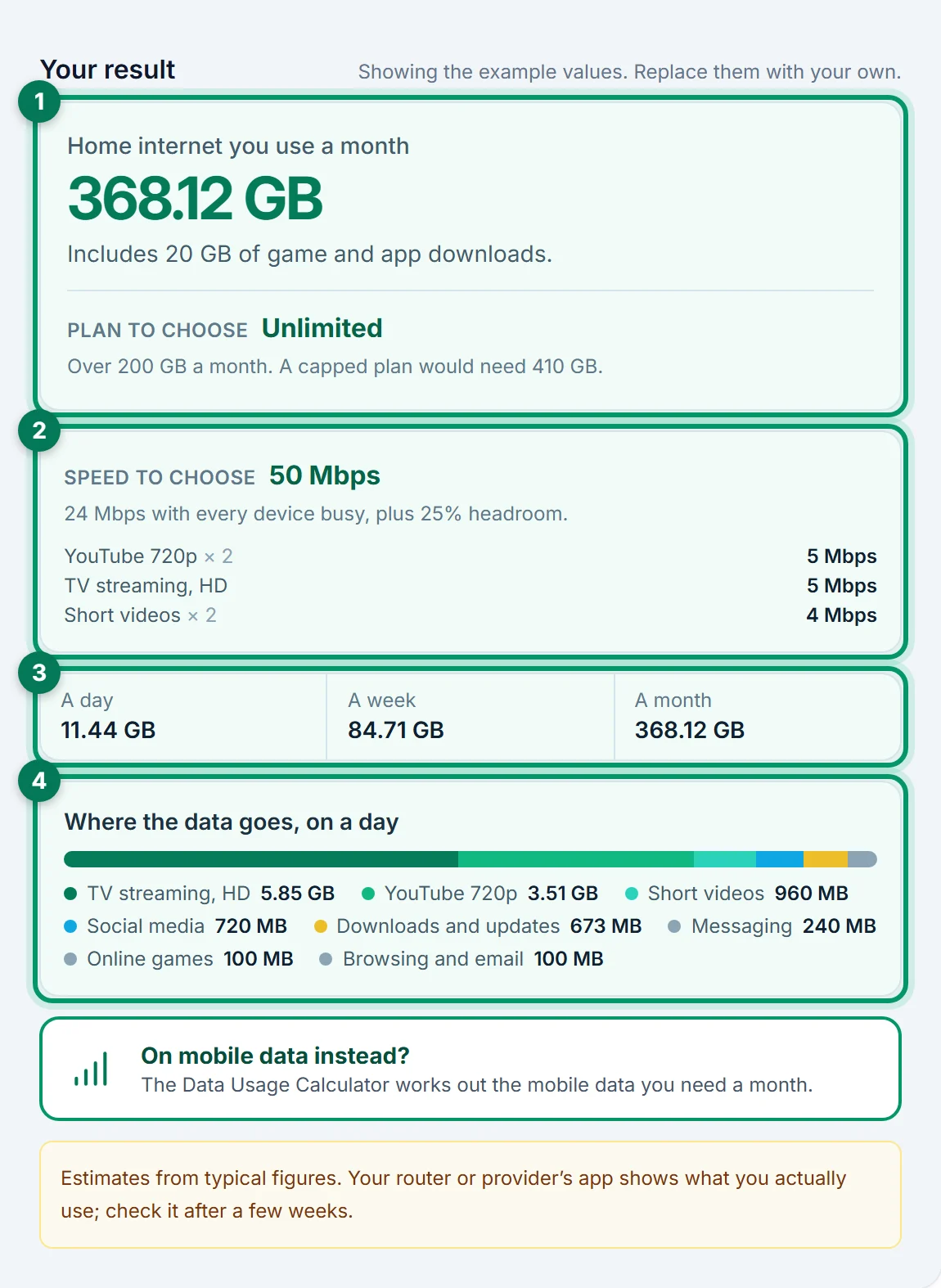
Here are the results for the example: the Family of 4 profile.
1. The family uses 368.12 GB a month
Seven activities come to 11,720 MB a day. Over an average month of 30.42 days that is 348.12 GB, plus 20 GB of game and app downloads: 368.12 GB.
With a 10% margin, a plan capped at 410 GB covers it. Above 200 GB a month, an unlimited fiber or cable plan usually fits better than a capped one.
2. The speed you need: a 50 Mbps plan
If everyone is online at once, the household needs about 24 Mbps: 5 for the TV in HD, 5 for two phones on YouTube at 720p, 4 for two on short videos, and the rest for social media, games, browsing and chat.
With 25% headroom that is 30 Mbps, so a 50 Mbps plan covers it.
3. A day, a week and a month
The same use per day (11.44 GB), per week (84.71 GB, with downloads spread evenly) and per month (368.12 GB).
4. Where the data goes
TV streaming in HD is the largest share (5.85 GB a day), then YouTube at 720p (3.51 GB) and short videos (960 MB). The 20 GB of downloads averages 673 MB a day.
Video is almost always most of a home’s use. Streaming the TV in HD instead of 4K, or phones at 480p, saves the most.
How the calculator works: inputs and results
Answers: How much home internet does my household use a month, and what speed do we need?
Inputs
| Input | What to enter |
|---|---|
| What your household does | Activities, the hours a day each device does them (1.5 or 1:30), and how many devices or people do it at the busiest time. Start from Solo, Family of 4, Work from home or Streamers and gamers. MB an hour can be changed. Example: The Family of 4 profile |
| Downloads and updates (optional) | Game, app and system downloads and cloud backups, in GB a month. One new game can be 50 to 150 GB. Example: 20 GB a month |
Results
| Result | What it tells you |
|---|---|
| Home internet you use a month | The main result, and a data cap with a 10% margin that covers it. |
| The speed you need | The download speed if every device is busy at once, and a plan speed with 25% headroom. |
| A day, a week and a month | The same use at each period. |
| Where the data goes | Each activity’s share of a day. |
The maths
A day = Σ hours × devices × MB an hour
A month = a day × 30.42 (365 ÷ 12) + downloads
Speed = Σ devices × Mbps per device; plan = speed × 1.25, rounded up to 10, 25, 50, 100, 200, 300, 500 or 1,000 Mbps
Cap = a month × 1.1, rounded up to a common size; GB = MB ÷ 1,024
Example
11,720 MB a day × 30.42 = 348.12 GB, + 20 GB downloads = 368.12 GB; a 410 GB cap. Peak 24 Mbps × 1.25 = 30 Mbps: a 50 Mbps plan.
Worked example: one person on prepaid home WiFi
Someone living alone uses prepaid home WiFi for chat, social media, an hour of YouTube at 720p and some browsing, with no TV streaming, plus 10 GB of updates a month. These figures are illustrative.
A day = 60 + 240 + 1,200 + 50 = 1,550 MB
A month = 1,550 × 30.42 = 46.04 GB, + 10 GB = 56.04 GB
With a 10% margin, a 72 GB promo covers it; a 10 Mbps connection is enough
Watch YouTube at 480p instead and the month falls to 34.65 GB, so a 40 GB promo.
How much data and speed does each activity use?
Per device. Speeds for streaming and calls are the services’ own recommendations: Netflix (5 Mbps for Full HD, 15 Mbps for 4K), YouTube (2.5 Mbps at 720p, 5 Mbps at 1080p) and Zoom (about 1.8 Mbps for a 720p group call). The rest are typical figures.
| Activity | MB an hour | Speed | 2 hours a day for a month |
|---|---|---|---|
| Messaging (Messenger, Viber) | 20 | 0.5 Mbps | 1.18 GB |
| Browsing and email | 50 | 1 Mbps | 2.97 GB |
| Music (Spotify) | 40 | 0.5 Mbps | 2.37 GB |
| Social media (Facebook, Instagram) | 120 | 1 Mbps | 7.12 GB |
| Short videos (TikTok, Reels) | 480 | 2 Mbps | 28.51 GB |
| Online games (Mobile Legends, PC) | 100 | 3 Mbps | 5.94 GB |
| Video meetings (Zoom, Teams) | 1,080 | 1.8 Mbps | 64.16 GB |
| YouTube 480p | 480 | 1.1 Mbps | 28.51 GB |
| YouTube 720p | 1,200 | 2.5 Mbps | 71.28 GB |
| YouTube 1080p | 2,500 | 5 Mbps | 148.51 GB |
| TV streaming, HD (Netflix) | 3,000 | 5 Mbps | 178.22 GB |
| TV streaming, 4K (Netflix) | 7,000 | 15 Mbps | 415.85 GB |
| CCTV camera, cloud or live view | 450 | 1 Mbps | 26.73 GB |
Video meetings and CCTV cameras also upload: Zoom asks for 1.2 to 2.6 Mbps up for 720p video. Most plans have far more download than upload speed, so check the upload figure if you work from home.
Capped or unlimited?
- Capped plans (prepaid home WiFi, pocket WiFi, some LTE and 5G home plans) suit light use: phones, social media and a little YouTube. Choose a promo above the calculator’s cap with the 10% margin.
- Unlimited plans (most fiber and cable) suit homes that stream to a TV, work from home or download games. Above about 200 GB a month, they usually cost less than topping up.
- Watch for fair-use policies. Some “unlimited” plans slow down after a monthly limit. Compare the calculator’s month with that limit.
Check what your home really uses
The figures here are typical. After a few weeks, compare the calculator with what your connection actually used.
- Your provider’s app or account page. Capped and prepaid plans show the data used and left; some fiber plans show it too.
- Your router. Open its admin page (often 192.168.1.1 or 192.168.0.1, printed on the router) and look for Statistics or Traffic. Many show use per device.
- Your phone. Android shows Wi-Fi use per app under Settings → Network & internet → Internet → (your Wi-Fi) or Data usage → Wi-Fi data usage. iPhone does not count Wi-Fi use.
Frequently asked questions
How much internet does a household use a month?
What internet speed do I need?
Is 100 GB a month enough for home internet?
Do uploads count against a data cap?
Can I use this for a pocket WiFi or phone hotspot?
Why add 25% to the speed?
Is anything saved when I copy a link to my result?
Related data calculators
Keep planning with the tools that answer the next question.
- Daily Data Usage CalculatorSee how much mobile data you can use each day until it expires, and whether your use will last. Open calculator
- Data Usage CalculatorEstimate the mobile data you need a month from what you do on your phone. Open calculator
- YouTube Data Usage CalculatorSee how much data a YouTube session uses at each video quality. Open calculator
- Netflix Data CalculatorSee how much data a Netflix series or movie uses at each quality. Open calculator
- Daily Spending Allowance CalculatorThe same idea for money: what you can spend each day until payday. Open calculator