
What is the 52-Week Savings Challenge Calculator?
The 52-Week Savings Challenge Calculator lays out the popular challenge: save a little more each week, 1 in week 1, 2 in week 2, up to 52 in week 52, for 1,378 in a year. Choose any step, the order and whether you save weekly or on paydays; it gives the total, every date and amount, a printable tracker and reminders.
₱20 more each week becomes ₱27,560 in a year
The first week, you set aside ₱20. The next, ₱40. By week 52 it is ₱1,040, and the year’s total is ₱27,560: 1,378 × ₱20. The early weeks are easy, which builds the habit; the late weeks are the test, which is why a printed chart and a weekly reminder help.
For a goal with a deadline instead of a challenge, use the Daily Savings Goal Calculator; for a safety net, the Emergency Fund Calculator.
How to use the calculator
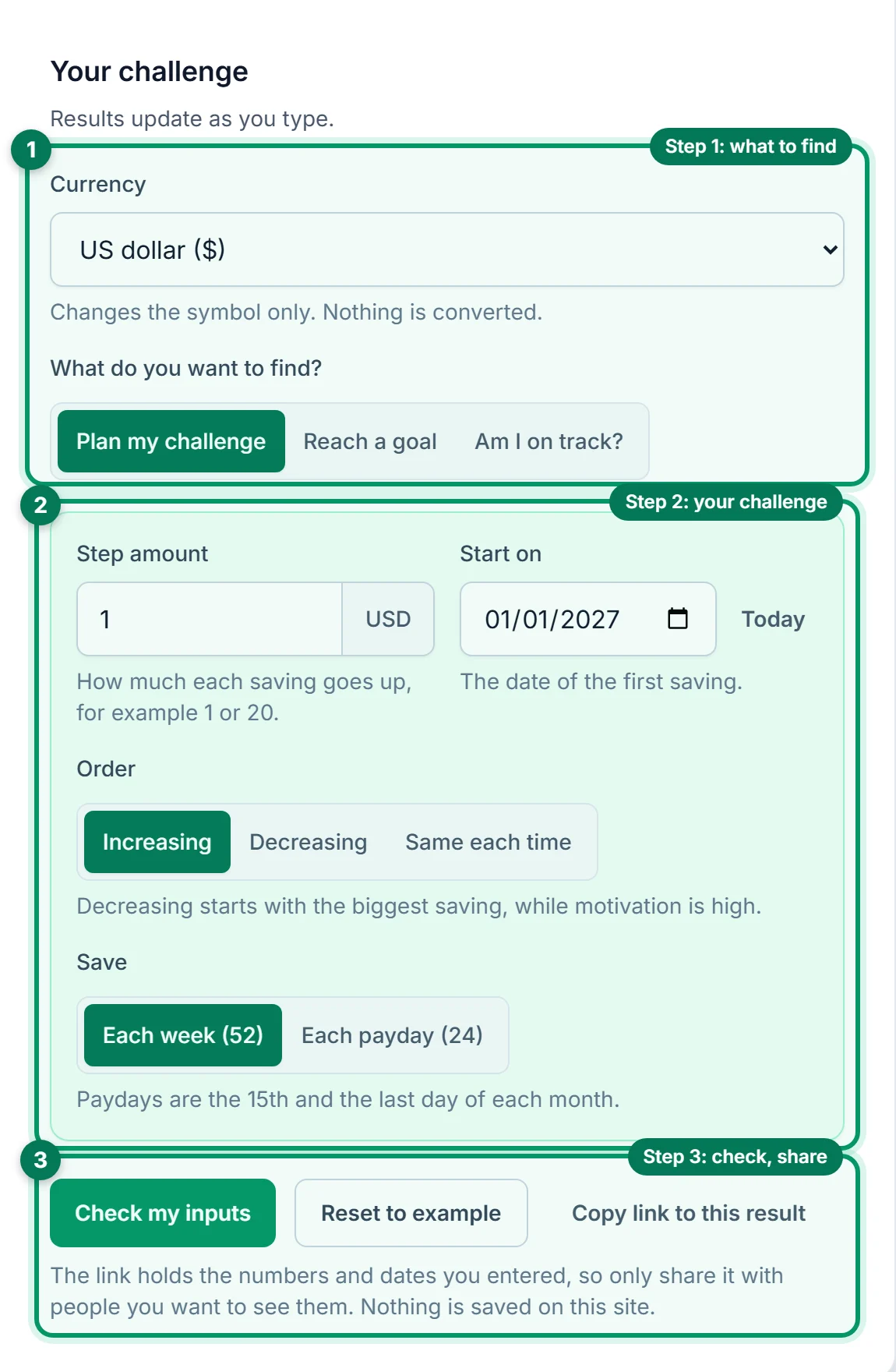
Choose what to find
Pick your Currency. Under What do you want to find?, choose Plan my challenge, Reach a goal or Am I on track?.
Set up your challenge
Enter the Step amount (or your Goal) and when you Start on. Choose the Order: increasing, decreasing or the same each time, and whether you Save each week or each payday.
Read, share or print
Results update as you type. Copy link to this result shares your plan, and under Keep to the plan you can print a tracker or add a reminder to your calendar.
Your results, explained
Here are the results for the example: the classic challenge with a step of 1, every week from 1 January 2027. Each numbered explanation matches a highlighted area in the image.
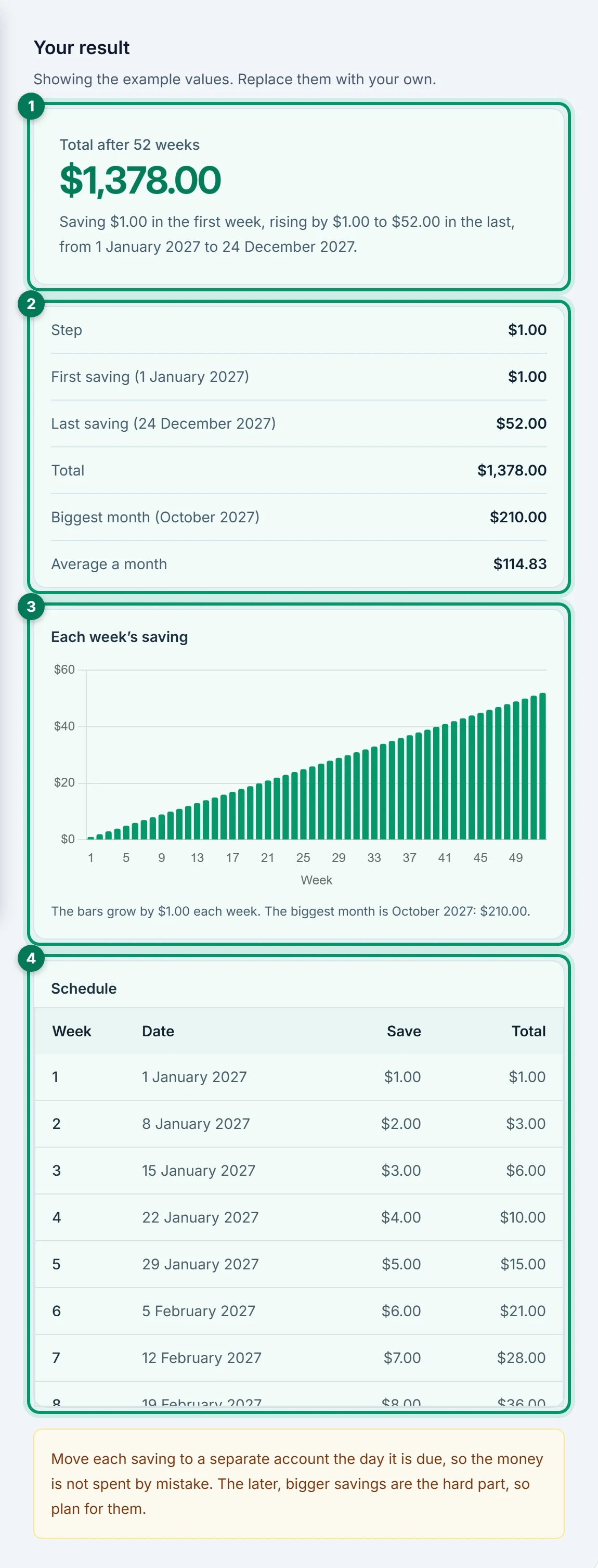
1. Total after 52 weeks: 1,378
The classic challenge: save 1 in week 1, 2 in week 2, and so on up to 52 in week 52. The steps add up to 1 + 2 + … + 52 = 1,378, so the total is 1,378 × the step.
2. The plan in numbers
The step, the first and last saving, the date the challenge ends (24 December 2027 for a 1 January start), the biggest month and the average a month: 1,378 ÷ 12 = 114.83.
3. The chart: each week’s saving
One bar per week, growing by the step. The right-hand bars are the hard part: the last 13 weeks hold 598 of the 1,378, about 43%.
4. The schedule
Every saving with its date, amount and running total. Week 26 ends at 351, about a quarter of the total, so most of the saving comes in the second half.
How each mode works: inputs and results
The calculator has three modes, chosen under What do you want to find? Pick a mode below to see exactly what it needs and what it shows. All three work with Copy link to this result.
Answers: If I follow the challenge, how much will I save, and what do I save each week?
Inputs
| Input | What to enter |
|---|---|
| Step amount | How much the saving changes each time, or the fixed amount for Same each time. Example: 1 (or 20 in pesos) |
| Order | Increasing (1 × step first), Decreasing (52 × step first) or Same each time. Example: Increasing |
| Save | Each week (52 savings, every 7 days) or each payday (24 savings, the 15th and the last day of the month). Example: Each week (52) |
| Start on | The date of the first saving. Today fills in your date. Example: 2027-01-01 |
Results
| Result | What it tells you |
|---|---|
| Total after … | The main result: what the whole challenge saves. |
| The plan in numbers | The first and last saving, the end date, the biggest month and the average a month. |
| Chart and schedule | Each saving as a bar, and every date with its amount and running total. |
| Keep to the plan | A printable tracker with a box to tick for each saving, and a repeating calendar reminder. |
The maths
Increasing or decreasing: total = step × n × (n + 1) ÷ 2, which is step × 1,378 for 52 weeks and step × 300 for 24 paydays
Same each time: total = step × n
Example
A step of 1 from 1 January 2027: 1 in week 1 up to 52 in week 52, 1,378 in all by 24 December 2027. A step of 20 gives 27,560.
Answers: What step amount do I need for the challenge to reach my goal?
Inputs
| Input | What to enter |
|---|---|
| Goal | The total you want from the challenge. Example: 5,000 |
| Order, Save and Start on | As in Plan my challenge. Example: Increasing, each week |
Results
| Result | What it tells you |
|---|---|
| Step to reach … | The main result: the whole-number step at or above goal ÷ 1,378 (or ÷ 300, or ÷ the number of savings), and the total it gives. |
| Chart, schedule and Keep to the plan | The same as Plan my challenge, at the step found. |
The maths
Exact step = goal ÷ (n × (n + 1) ÷ 2), or goal ÷ n for Same each time
Step = the exact step rounded up to a whole number
Example
A goal of 5,000 needs 5,000 ÷ 1,378 = 3.63, so a step of 4: 5,512 in all.
Answers: Partway through, have I saved what the challenge says I should have?
Inputs
| Input | What to enter |
|---|---|
| Step amount, Order, Save and Start on | The challenge you are following. Example: 1, increasing, each week, 2027-01-01 |
| Today and Saved so far | Today’s date and what you have saved in the challenge. Example: 2027-07-01 and 300 |
Results
| Result | What it tells you |
|---|---|
| You’re ahead / behind the challenge by | The main result: what you have against the challenge’s running total for the savings already due. |
| Next saving | The amount and date of the next saving. |
The maths
Planned so far = the running total of every saving dated on or before today
Example
By 1 July 2027, 26 weeks have passed and the challenge would have 351. With 300 saved you are 51 behind; next is 27 on 2 July.
How much you save, by step
Each week the saving goes up by the step, so the total is the step × 1,378 over 52 weeks, or the step × 300 over 24 paydays.
| Step | Week 52 saving | 52 weeks | 24 paydays |
|---|---|---|---|
| 1 | 52.00 | 1,378.00 | 300.00 |
| 5 | 260.00 | 6,890.00 | 1,500.00 |
| 10 | 520.00 | 13,780.00 | 3,000.00 |
| 20 | 1,040.00 | 27,560.00 | 6,000.00 |
| 50 | 2,600.00 | 68,900.00 | 15,000.00 |
| 100 | 5,200.00 | 137,800.00 | 30,000.00 |
Worked example: the payday challenge in the Philippines
Paid on the 15th and the last day of the month, you save ₱50 on the first payday, ₱100 on the second, and so on, rising by ₱50 each payday from 15 January 2027. These figures are illustrative.
Steps: 1 + 2 + … + 24 = 300
Total = ₱50 × 300 = ₱15,000 by 31 December 2027
Biggest month: December, ₱1,150 + ₱1,200 = ₱2,350
The biggest savings land in December, when many employees in the Philippines receive their 13th-month pay, which makes the hardest month easier to finish. Prefer an easier end of year? Choose Decreasing to put the biggest savings in January instead.
Tips to finish the challenge
- Print the tracker. Ticking a box each week, like filling an alkansya, keeps the habit visible.
- Set the reminder. A note on every saving day means you do not have to remember.
- Try it in reverse. Decreasing puts the biggest amounts first, while motivation is high.
- Keep it separate. Move each saving to its own account; see what it earns with the Daily Interest Calculator.
- Missed a week? Use Am I on track? to see the gap and catch up.
Frequently asked questions
How does the 52-week savings challenge work?
How much do you save in the 52-week challenge?
Is it easier to do the challenge in reverse?
Can I do it on paydays instead of every week?
What step do I need for a goal?
I missed some weeks. What now?
Is anything saved when I copy a link to my result?
Does changing the currency convert my amounts?
Related interest and savings calculators
Keep planning with the tools that answer the next question.
- Daily Interest CalculatorSee what a balance earns or costs each day, compare two rates, or check a statement. Open calculator
- Daily Compound Interest CalculatorSee money grow with interest added every day, the days to a goal, or the daily rate needed. Open calculator
- Daily Savings Goal CalculatorFind how much to save each day, week or payday to reach a goal by a date. Open calculator
- Emergency Fund CalculatorFind how big your emergency fund should be, when you will reach it, or how long it would last. Open calculator
- Sinking Fund CalculatorSave ahead for insurance, school fees and other planned costs, fund by fund. Open calculator
- Time to Save CalculatorSee how long a goal takes and the date you reach it, saving each day, week, payday or month. Open calculator
- APY CalculatorConvert an APR to APY for any compounding, or compare two savings accounts. Open calculator
- Simple Interest CalculatorFind simple interest, or the rate, time or principal behind it, and check add-on loans. Open calculator
- CD CalculatorSee what a certificate of deposit is worth at maturity, or what withdrawing early costs. Open calculator
- Credit Card Interest CalculatorSee how long a card takes to pay off, what paying more saves, or one month’s interest. Open calculator
- Average Daily Balance CalculatorAverage a balance over a statement period, or see what to deposit to meet a maintaining balance. Open calculator
- CAGR CalculatorFind the yearly growth rate between two values, or project one forward. Open calculator
- Dividend Reinvestment CalculatorSee how income grows when every payout is reinvested. Open calculator