
What is the Savings Rate Calculator?
The Savings Rate Calculator divides what you save by your take-home pay to give your savings rate, the share of your pay you keep for later. It also shows how much more you would need to save to reach a target such as 20%, and how many months of your spending each year of saving buys.
Are you saving enough?
Saving 600 a month sounds good or bad depending on what you earn. Out of 4,000 take-home pay it is 15%: every year you put away about two months of your spending. A rate lets you compare with a goal, with last year, or with a partner, whatever your pay.
Once you know your rate, the Daily Savings Goal Calculator and the Time to Save Calculator turn it into a plan for a specific goal.
How to use the calculator
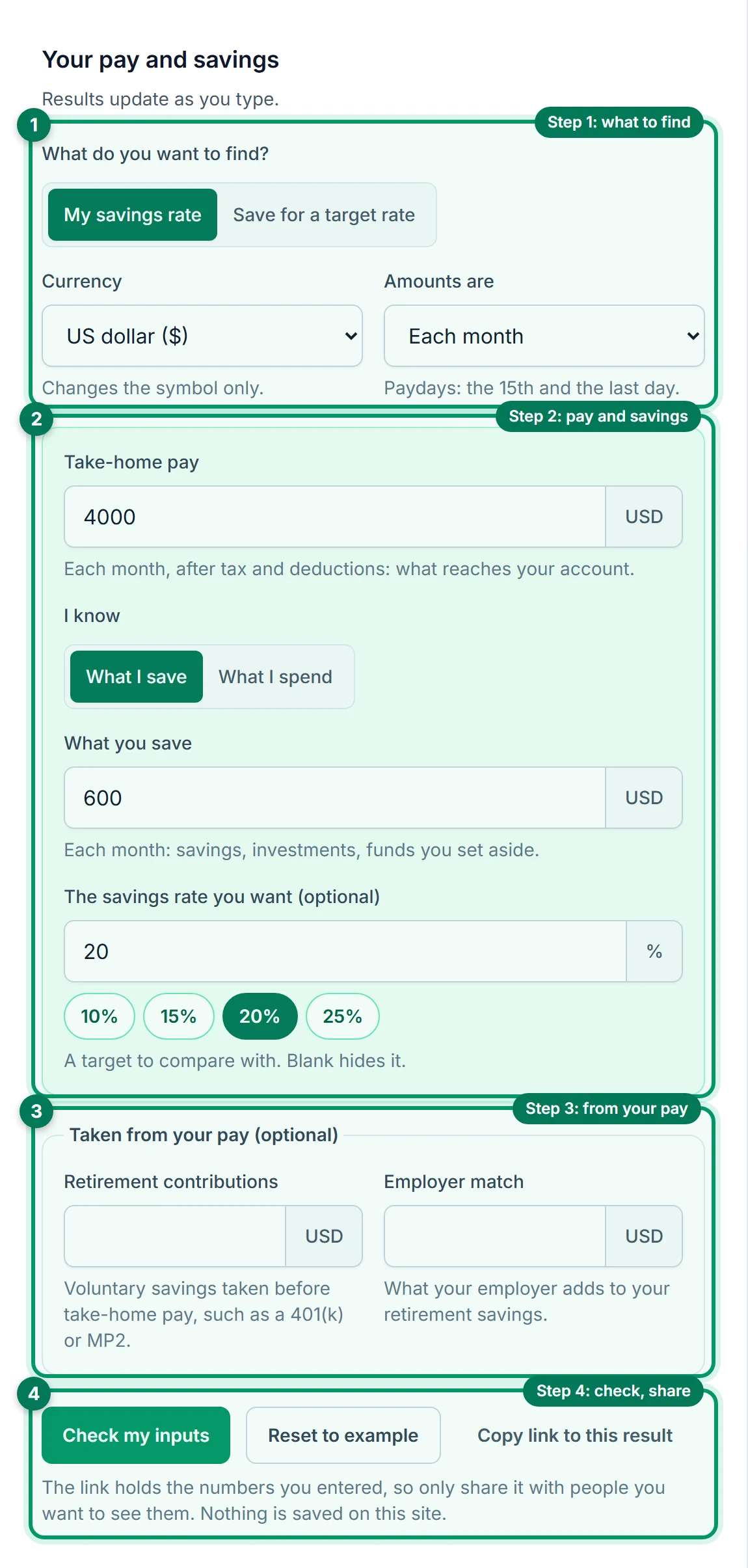
Choose what to find
Choose My savings rate to measure what you save now, or Save for a target rate to find what a rate takes. Pick your Currency, and under Amounts are say how often you are paid: each week, payday, month or year.
Enter your pay and savings
Enter your Take-home pay, what reaches your account. Under I know, choose What I save or What I spend, whichever you know better, and enter it. Add The savings rate you want to compare with, or pick 10%, 15%, 20% or 25%.
Add savings taken from your pay
If voluntary Retirement contributions come out of your pay before you get it, or your employer adds an Employer match, enter them: they count as savings, and as pay. Leave them blank if not.
Read or share the result
Results update as you type. Below your target, enter your yearly raise and how much of it to save under Or get there with your raises. Check my inputs points to anything that needs fixing, and Copy link to this result gives a link with your numbers in it.
Your results, explained
Here are the results for the example values: 4,000 take-home pay a month, 600 saved and a 20% target. Each numbered explanation matches a highlighted area in the image.
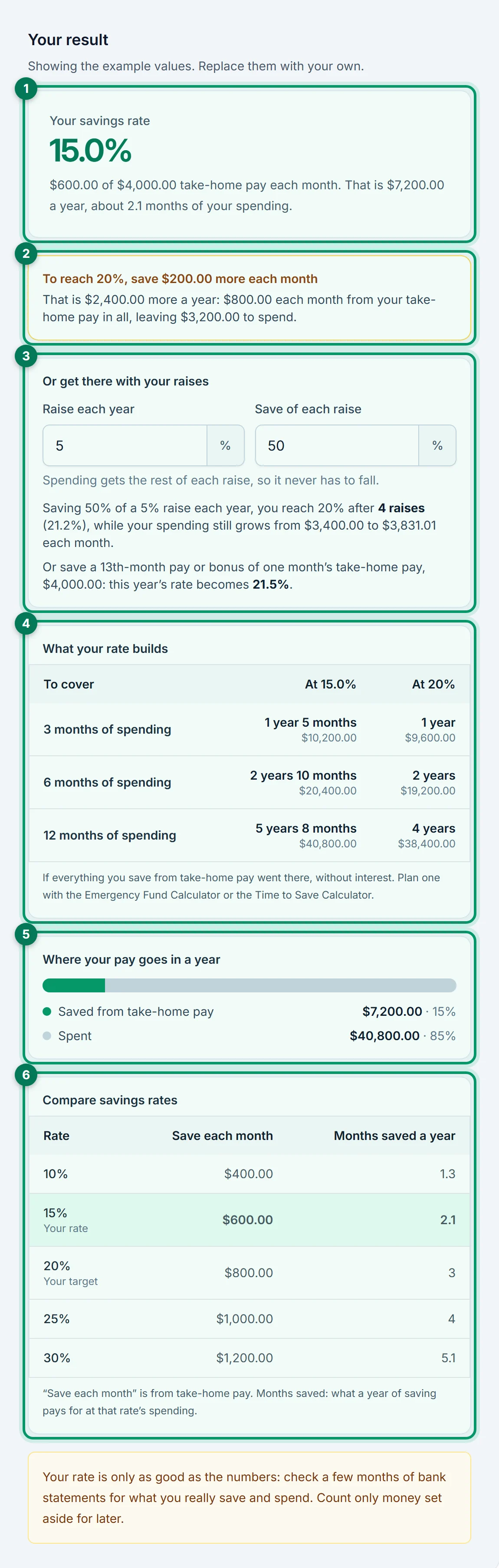
1. Your savings rate: 15.0%
600 saved out of 4,000 take-home pay a month is 600 ÷ 4,000 = 15%. Over a year that is 7,200, about 2.1 months of your spending.
Months of spending is what a year’s savings would pay for at your current spending: 7,200 ÷ 3,400 = 2.1. It grows quickly as the rate rises.
2. To reach 20%, save 200 more each month
20% of 4,000 is 800 a month, so 200 more than you save now: 2,400 more a year, leaving 3,200 a month to spend.
Change the target under The savings rate you want, or pick 10%, 15%, 20% or 25%. Leave it blank to hide this card.
3. Or get there with your raises
Saving half of a 5% raise each year takes you from 15% to 16.7%, 18.3%, 19.8% and then 21.2% after 4 raises, while your spending still grows from 3,400 to 3,831.01 a month.
Or save a 13th-month pay or bonus of one month’s take-home pay, 4,000: that alone lifts this year to 21.5%. Change the raise and the share you save in the card.
4. What your rate builds
At 15%, three months of spending, 10,200, takes 1 year 5 months to save; six months, 2 years 10 months; a whole year, 5 years 8 months.
At 20% the same take 1 year, 2 years and 4 years. The funds are smaller too, 9,600 for three months, because you spend less.
5. Where your pay goes
The bar splits your year into what you save, 7,200, and what you spend, 40,800. Retirement contributions and an employer match show as their own parts when you enter them.
6. Compare savings rates
What 10% to 30% means for your pay: 400, 600, 800, 1,000 and 1,200 a month, and 1.3, 2.1, 3, 4 and 5.1 months of spending saved each year.
Your rate is highlighted, and your target is marked. Going from 15% to 25% almost doubles what each year buys you, from 2.1 to 4 months.
How each mode works: inputs and results
The calculator has two modes, chosen under What do you want to find? Pick a mode below to see exactly what it needs and what it shows. Both work with Copy link to this result.
Answers: What share of my pay am I saving, and how far am I from my target?
Inputs
| Input | What to enter |
|---|---|
| Amounts are | How often the amounts you enter come: each week, payday (the 15th and the last day of the month), month or year. Example: Each month |
| Take-home pay | What reaches your account after tax and deductions. Example: 4,000 |
| What I save or What I spend | Enter what you save, or what you spend if that is easier: the calculator takes it from your pay. Example: Save 600, or spend 3,400 |
| The savings rate you want (optional) | A target to compare against. Blank hides the target card. Example: 20 |
| Retirement contributions and Employer match (optional) | Savings taken from your pay before you get it, and what your employer adds. Example: Blank, or 200 and 100 |
Results
| Result | What it tells you |
|---|---|
| Your savings rate | The main result: what you save as a share of your pay, and what it adds up to in a year. |
| To reach your target | How much more to save each time, or how far above it you are. |
| Or get there with your raises | Shown when you are below your target: after how many yearly raises saving part of each one gets you there, and what saving a 13th-month pay does. |
| What your rate builds | How long your savings take to cover 3, 6 and 12 months of spending, at your rate and at your target. |
| Where your pay goes and Compare savings rates | Your year split into saving and spending, and what 10% to 30% would mean for your pay. |
The maths
Saved = what you save, or take-home pay − what you spend
Savings rate = (saved + contributions + match) ÷ (take-home pay + contributions + match)
Months of spending saved each year = a year’s savings ÷ a month’s spending = 12 × rate ÷ (100 − rate)
Example
600 saved from 4,000 a month is 15%: 7,200 a year, 2.1 months of spending. Reaching 20% takes 200 more a month.
Answers: How much should I save to reach a savings rate, such as 20%?
Inputs
| Input | What to enter |
|---|---|
| Amounts are and Take-home pay | As in My savings rate. Example: 4,000 each month |
| The savings rate you want | The rate to reach. Pick 10%, 15%, 20% or 25%, or type your own. Example: 20 |
| Retirement contributions and Employer match (optional) | They count towards the rate, so you need less from take-home pay. Example: Blank |
Results
| Result | What it tells you |
|---|---|
| Save each … for … | The main result: the amount to save each time, and what is left to spend. |
| The same in other periods | That amount each day, week, payday, month and year. |
| What your rate builds | How long saving that amount takes to cover 3, 6 and 12 months of spending. |
| Where your pay goes and Compare savings rates | Your pay split at that rate, and the amounts for 10% to 30%. |
The maths
Total to save = target × (take-home pay + contributions + match)
From take-home pay = total to save − contributions − match
Example
20% of 4,000 a month is 800 a month: 400 each payday, 184.62 a week or 26.30 a day, leaving 3,200 a month to spend.
Worked example: paid on paydays, with MP2 and 13th-month pay
You take home ₱18,000 each payday, the 15th and the last day of the month. You move ₱2,500 to savings each payday, and ₱500 for Pag-IBIG MP2 comes out of your pay before you get it. These figures are illustrative.
Saved each payday = ₱2,500 + ₱500 MP2 = ₱3,000
Pay each payday = ₱18,000 + ₱500 = ₱18,500
Savings rate = ₱3,000 ÷ ₱18,500 = 16.2%
To reach 20%: ₱3,700 in all, so ₱3,200 from take-home pay, ₱700 more each payday
Now count the year, with a ₱36,000 13th-month pay that you save in full. Choose Each year:
Take-home pay = ₱18,000 × 24 + ₱36,000 = ₱468,000
Saved = ₱2,500 × 24 + ₱36,000 = ₱96,000, plus ₱12,000 MP2
Savings rate = ₱108,000 ÷ ₱480,000
22.5% for the year: saving the 13th-month pay lifts you past 20%
Leave out the required SSS, PhilHealth and Pag-IBIG contributions: they are social insurance, already taken before take-home pay.
What is a good savings rate?
There is no single right number, but a few rules of thumb help. The 50/30/20 budget puts 20% of take-home pay towards savings and paying down debt. Retirement guides often suggest 10% to 15% for retirement alone. If you are starting from nothing, any steady rate is a good start: raise it a little each time your pay goes up.
| Savings rate | Months of spending saved each year |
|---|---|
| 10% | 1.3 |
| 15% | 2.1 |
| 20% | 3 |
| 25% | 4 |
| 30% | 5.1 |
| 50% | 12 |
The months come from 12 × rate ÷ (100 − rate), whatever your pay: saving more also means spending less, so each step up counts twice. At 50% a year of saving pays for a whole year of living. That is why a three-to-six-month emergency fund takes about one to two years at 20%.
Raise your rate without spending less
Cutting spending to save more is hard to keep up. Saving part of every raise is easier: your spending still grows, just more slowly than your pay. With the example’s 4,000 a month at 15%, a 5% raise each year, and half of each raise saved:
After 1 raise: pay 4,200 a month, saved 700: 16.7%
After 2 raises: 18.3%; after 3: 19.8%
After 4 raises: 21.2%, with spending up from 3,400 to 3,831.01 a month
A 13th-month pay or yearly bonus works faster. Saving one month’s take-home pay, 4,000, lifts the example’s year from 15% to 11,200 ÷ 52,000 = 21.5%, with no change to your monthly budget.
What counts as savings?
- Count: savings accounts, emergency and sinking funds, investments, voluntary retirement contributions such as a 401(k) or Pag-IBIG MP2, and an employer match.
- Your choice: extra payments on a loan beyond the minimum. They build your net worth, so some people count them; say so when you compare rates.
- Leave out: money set aside for this month’s bills, and required social insurance such as SSS and PhilHealth.
Before relying on the result
- Use real numbers. Take what you saved and spent from a few months of statements, not what you plan to.
- Irregular pay. If your pay changes, choose Each year and enter the whole year’s take-home pay.
- Same basis. This rate uses take-home pay. A rate based on pay before tax is lower for the same savings.
- A rate is not a plan. Pair it with a goal and a date, using the savings calculators below.
Frequently asked questions
How do I calculate my savings rate?
What is a good savings rate?
Should I use take-home pay or pay before tax?
What counts as savings?
Do SSS, PhilHealth and Pag-IBIG contributions count as savings?
What if I do not know how much I save?
What does months of spending saved mean?
How can I raise my savings rate without cutting my spending?
How long will an emergency fund take at my savings rate?
Is anything saved when I copy a link to my result?
Does changing the currency convert my amounts?
Related interest and savings calculators
Keep planning with the tools that answer the next question.
- Daily Interest CalculatorSee what a balance earns or costs each day, compare two rates, or check a statement. Open calculator
- Daily Compound Interest CalculatorSee money grow with interest added every day, the days to a goal, or the daily rate needed. Open calculator
- Daily Savings Goal CalculatorFind how much to save each day, week or payday to reach a goal by a date. Open calculator
- Emergency Fund CalculatorFind how big your emergency fund should be, when you will reach it, or how long it would last. Open calculator
- 52-Week Savings Challenge CalculatorPlan the 52-week challenge, weekly or on paydays, with a printable tracker. Open calculator
- Sinking Fund CalculatorSave ahead for insurance, school fees and other planned costs, fund by fund. Open calculator
- Time to Save CalculatorSee how long a goal takes and the date you reach it, saving each day, week, payday or month. Open calculator
- APY CalculatorConvert an APR to APY for any compounding, or compare two savings accounts. Open calculator
- Simple Interest CalculatorFind simple interest, or the rate, time or principal behind it, and check add-on loans. Open calculator
- CD CalculatorSee what a certificate of deposit is worth at maturity, or what withdrawing early costs. Open calculator
- Credit Card Interest CalculatorSee how long a card takes to pay off, what paying more saves, or one month’s interest. Open calculator
- Average Daily Balance CalculatorAverage a balance over a statement period, or see what to deposit to meet a maintaining balance. Open calculator
- CAGR CalculatorFind the yearly growth rate between two values, or project one forward. Open calculator
- Dividend Reinvestment CalculatorSee how income grows when every payout is reinvested. Open calculator